
Meal Planner & Recipe Keeper
StashcookFood & Drink
4.51.04K Reviews
- Version
- 1.5.32
- Installs
- 1.00M
- Age Rating
- Everyone
Screenshots

Our Review of Meal Planner & Recipe Keeper
 Analysis by Appyee
I tend to judge a meal-planning app by a very ordinary test: can it help me make a decision before I get hungry, tired, and tempted to order something? Meal Planner & Recipe Keeper is built around bringing recipes, a weekly plan, and a grocery list into one place. That makes it most appealing when the problem is not a lack of cooking ideas, but the effort of keeping those ideas organized and turning them into a workable week.
This is a free food-and-drink app from Stashcook, with optional in-app purchases. It has a 4.6 average from around 11,000 ratings, and has been installed over 500,000 times. The app is rated for Everyone; its current version is 1.2.240 and it requires Android 8.0 or later. Those details make it easy to judge whether it fits your device and expectations, but the more important question is whether its workflow fits the way you cook.
Finding Your Way Around the Kitchen Planner
Have you ever found yourself staring blankly into your fridge, wondering what to cook for dinner? Trust me, I've been there! That's when I stumbled upon this nifty app called Meal Planner & Recipe Keeper. It's like having a digital sous-chef right in your pocket. So, let me take you through my experience with this app, and why I think it's worth checking out if meal planning is as much of a struggle for you as it is for me.
First things first, downloading the app was a breeze. Available for both Android and iOS, it didn't take long to set up. Once installed, you're greeted with a clean and intuitive interface. The app guides you through the process with simple prompts, making it super easy to dive right into meal planning.
The app’s home screen is where all the magic happens. You can add recipes, plan your meals for the week, and even generate a shopping list. It's like having your own little culinary command center. I was impressed by how organized everything felt right off the bat.
Keeping Recipes Readable and Useful
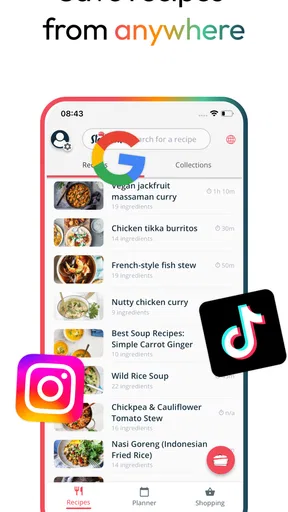
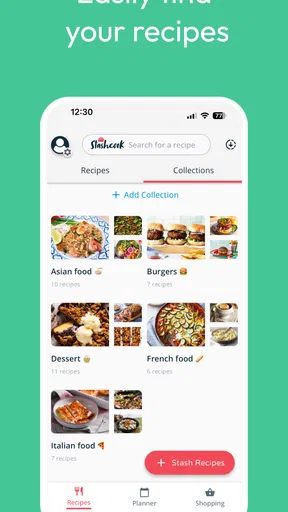
One of my favorite features has to be the recipe section. Whether you want to discover new dishes or keep all your family favorites in one place, this app has got you covered. You can search for recipes by ingredients, cuisine, or meal type, making it easy to find exactly what you’re craving.
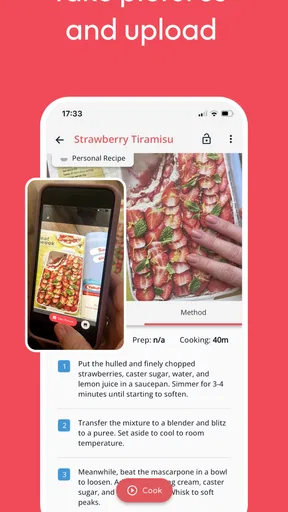
Adding a new recipe is as simple as pie (pun intended!). You can manually enter recipes, or if you're feeling a bit lazy like me, you can import them directly from websites. The app does a pretty good job of recognizing ingredients and steps, saving you tons of time.
In practical use, importing is a shortcut rather than a guarantee that a recipe will be perfect. I would still scan the ingredients and instructions after bringing one in, especially if a webpage has a long introduction or unusual formatting. That quick check matters because a small import mistake can become confusing when you are cooking with wet hands and trying to follow steps in order. For recipes you make often, manually tidying the wording and adding a note can be worthwhile; for a one-time experiment, I would not spend long polishing it.
The ingredient search is especially useful when I already have a few things to use up. Instead of browsing recipes at random, I can start with what is in the fridge and narrow the choice from there. It is not a substitute for checking quantities or freshness, but it can turn “I have spinach and eggs” into a more focused search than opening several unrelated recipe sites.
Planning Around Real Days, Not Ideal Ones
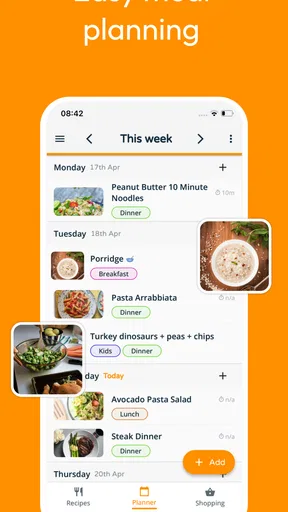
Gone are the days of scribbling meal plans on scrap paper. With this app, you can easily plan out your meals for the entire week. I loved how you can drag and drop recipes into your weekly calendar. It’s super satisfying to see the week fill up with delicious meals.
The app also allows you to set reminders for meal prep or cooking times, ensuring you never forget to defrost that chicken or preheat the oven. This feature is a lifesaver for someone as forgetful as me!
The calendar is most helpful when I treat it as a flexible draft, not a promise that every evening will go according to plan. I like to put the meals that need the most advance work on days when I know I have time, then leave an easier option for a busy night. If plans change, moving a recipe is less effort than rewriting a paper schedule, and the list can follow the choices I have actually made.
A realistic Sunday routine might be to choose a few dinners, place them across the week, and make the shopping list before heading out. I would leave one evening uncommitted if leftovers or a change of plans are likely. That small bit of slack makes the plan easier to keep, and it prevents the calendar from becoming another chore that makes me feel behind.
For someone cooking for a household, the plan can also make preferences easier to remember. I can use the family ratings to steer toward meals people already enjoy, while still leaving room to try something new. It is a modest but useful way to avoid repeatedly asking everyone what they want at the last minute.
Using the Shopping List Without Overtrusting It
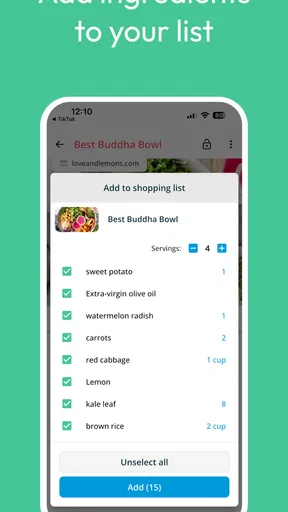
Now, let’s talk about the shopping list feature. It's incredibly handy. The app automatically generates a shopping list based on your meal plan. You can add, remove, or check off items as you shop, keeping everything organized.
What’s cool is that the list is categorized into sections like produce, dairy, and meats, making it efficient when you’re navigating through the aisles. I found this feature cut down my shopping time significantly.
I would use the generated list as a starting point and do one final pass before leaving home. Check the pantry for staples, remove anything you already have, and make sure the quantities suit the number of people you are feeding. This is a practical trade-off with any plan-based list: it can collect what the recipes call for, but only you know what is already in your cupboard or whether you want to buy a larger pack for another meal.
Once I am in the shop, checking items off as I go is less distracting than switching between a recipe page and a separate notes app. The categories help me move through the aisles in a sensible order. If I often shop in a different layout, though, I may still want to review the list before starting rather than assume the categories match my usual route.
Personal Details That Improve Repeat Cooking
One thing that really stood out to me is how customizable the app is. You can adjust serving sizes, add notes to recipes, and even upload photos of your culinary creations. It feels personal, like the app is truly tailored to your cooking style and preferences.
Plus, there’s a nifty feature where you can record your family's ratings for each meal, helping you remember which recipes were a hit and which might need a little tweaking.
Those notes are more useful when they capture a decision I would otherwise forget: whether the dish needed less salt, what I substituted, or how much food was left over. I would keep them short and specific so they are easy to scan next time. A photo can help me remember how a meal turned out, but it is not necessary for the app to be useful; the serving adjustment and a few practical notes can do more for repeat cooking than a gallery of pictures.
Different Needs, Different Levels of Access
The app’s straightforward organization can make it easier to keep track of several parts of cooking without moving between a recipe collection, calendar, and shopping notes. That can be helpful for someone who prefers a visible plan, or for a household where more than one person needs to know what is intended for dinner. It also gives me a place to record recipes in my own words, which can be easier to revisit than trying to remember which website I used.
For motor comfort, the drag-and-drop calendar is convenient when it works with the way I handle a phone, but it may not be the best interaction for everyone. If precise dragging is awkward, I would test how easy it is to select and move a meal on your device before building a full week around it. Likewise, cooking often means glancing at a screen from a distance or with hands that are not clean, so a concise recipe note and a planned sequence can reduce extra tapping while preparing food.
For sensory needs, I would keep the app’s role simple: use it to decide and organize, then avoid adding unnecessary visual clutter to the recipe record. People who depend on specific text size, contrast, screen-reader behavior, or voice control should try the actual screens on their own device before relying on it for every cooking step. A clean-looking interface is pleasant, but it does not by itself tell me whether every interaction will suit every ability.
Situational access matters too. At home, I can plan at a comfortable pace and check a recipe before cooking. In a crowded grocery store, I may prefer to prepare the list in advance, group my decisions, and avoid changing the weekly plan while navigating the aisles. If I am cooking with another person, notes and ratings can preserve useful household knowledge, though the app should not be treated as a substitute for clear communication about allergies or dietary restrictions.
Where This App Fits—and Where It Does Not
Compared with keeping recipes in browser bookmarks and writing a shopping list on paper, this app brings more of the process together: saved dishes can feed into a week plan, and the plan can inform what to buy. That connection is its main advantage. A plain notes app may be faster if I only need a short list, while a spreadsheet can suit someone who wants complete control over a custom meal schedule. Those options lack the same ready-made recipe-to-plan flow, but they may feel simpler to people who dislike maintaining a dedicated system.
I would recommend trying it if you repeatedly lose recipes, struggle to decide what to cook, or want a shopping list that reflects planned meals. It is also a good fit for someone learning to build a routine around a small set of reliable dinners. On the other hand, if you cook spontaneously, rarely shop from a plan, or want a highly specialized nutrition tracker, this may be more organization than you need. The free download is easy to try, while optional in-app purchases range from $3.99 to $139.99 per item, so I would check what an upgrade offers before paying and avoid assuming that every useful workflow requires one.
Final Thoughts
After using the app for a while, I must say it’s become an indispensable part of my weekly routine. It's not just about planning meals—it’s about making the entire process of cooking and shopping more enjoyable and less of a chore.
If you're someone who dreads the question "What's for dinner?", this app might just be your new best friend. With its user-friendly design, extensive recipe collection, and efficient planning tools, it takes the stress out of meal prep. So, why not give it a try and see how it transforms your kitchen adventures?
My overall take is that this is a practical organizer rather than a cooking authority. It helps me make a plan, keep recipes together, and carry a more orderly list into the store, but the quality of the result still depends on my own choices: checking imported instructions, allowing for schedule changes, and reviewing what I already have at home. Those small habits make the app more dependable without asking it to manage every detail of a household.
For inclusive use, I would approach it as a helpful option to test, not a guaranteed fit for every device, body, or kitchen. The best sign is whether I can comfortably find a recipe, understand the steps, and update the plan in the situations where I actually cook and shop. If those everyday interactions work for you, its connected recipe and planning tools can make meal decisions feel noticeably less scattered.
Privacy and Permissions
See what permissions an app requests and how it handles your data.
- Photos/Media/Files
- read the contents of your USB storage, modify or delete the contents of your USB storage
- Storage
- read the contents of your USB storage, modify or delete the contents of your USB storage
- Camera
- take pictures and videos
- Microphone
- record audio
- Other
- view network connections, full network access, run at startup, control vibration, prevent device from sleeping, Google Play license check
Verdict
Strengths of Meal Planner & Recipe Keeper
- Intuitive interface simplifies meal planning.
- Large recipe database for diverse options.
- Customizable meal plans fit dietary needs.
- Integration with grocery lists saves time.
- Offline access ensures convenience anytime.
Limitations of Meal Planner & Recipe Keeper
- Limited free features; premium required.
- Occasional syncing issues with cloud.
- No voice command support for recipes.
- Lacks integration with fitness apps.
- Ads can be intrusive in free version.
Similar Picks in This Category
View All
Rappi: Food Delivery, Grocery
Rappi, Inc - Delivery3.5

McDonald’s: Cupons e Delivery
Arcos Dorados4.3

Swiggy: Food Instamart Dineout
Swiggy4.7

Blinkit: Groceries & more
Blinkit4.8

foodpanda: food & groceries
Foodpanda GmbH a subsidiary of Delivery Hero SE4.0

Zomato: Food Delivery & Dining
Zomato4.7
Frequently Asked Questions
What features does Meal Planner & Recipe Keeper offer?
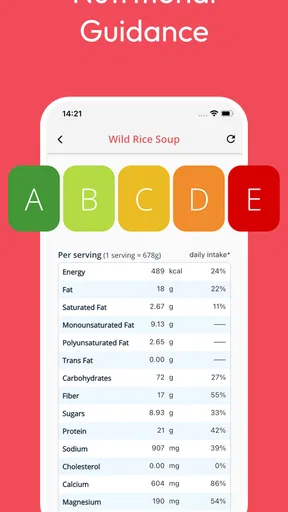
Meal Planner & Recipe Keeper provides a comprehensive suite of features including personalized meal planning, a vast library of recipes, grocery list integration, and nutritional tracking. Users can customize meal plans and access recipes based on dietary preferences, making it a versatile tool for anyone looking to organize their meals efficiently.
Is the app suitable for people with dietary restrictions?
Yes, Meal Planner & Recipe Keeper is designed to accommodate various dietary restrictions. It offers filtering options for vegan, vegetarian, gluten-free, and other dietary preferences. Users can easily find and save recipes that meet their specific needs, ensuring that meal planning is both inclusive and convenient.
Does the app have a feature for sharing recipes with others?
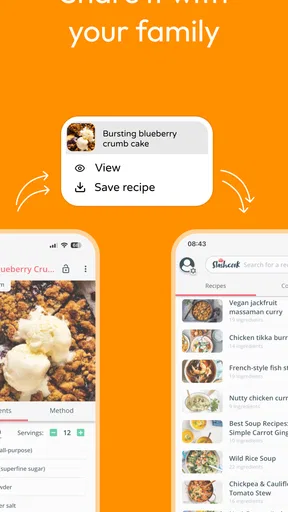
Absolutely, Meal Planner & Recipe Keeper includes a sharing feature that allows users to share their favorite recipes with friends and family. This can be done via social media or direct messaging, making it simple to spread culinary inspiration and collaborate on meal planning with loved ones.
How user-friendly is the Meal Planner & Recipe Keeper app?
The app is designed with user-friendliness in mind, featuring an intuitive interface that is easy to navigate. Both newcomers and seasoned users will find it straightforward to plan meals, explore recipes, and manage grocery lists. The app provides clear instructions and helpful tips throughout to enhance the user experience.
Is there a cost associated with using Meal Planner & Recipe Keeper?
Meal Planner & Recipe Keeper offers a free version with basic features. However, for users seeking more advanced functionalities, such as additional recipes, personalized meal plans, and ad-free experience, there is a premium subscription available. This allows users to choose the level of service that best fits their needs and budget.
